When an SEO company asks for FTP access to your website, something genuinely exciting is happening behind that request. The team is ready to move beyond surface-level work and reach the server-level configurations that deliver real, lasting improvements in search engine rankings. File Transfer Protocol connects SEO professionals directly to your website’s file system, and that access is what makes thorough, high-impact technical optimization truly possible.
Most businesses hire an SEO agency because they want stronger organic visibility, better web performance, and steadier growth in qualified traffic. Reaching those outcomes consistently calls for access to the configuration files that govern how a website actually behaves. Understanding what FTP enables, how SEO professionals use it productively, and how to share that access securely puts you in a fully informed and empowered position as a client.
How File Transfer Protocol Powers Technical SEO Work
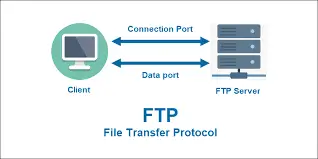
File Transfer Protocol is a communication protocol purpose-built for moving computer files between a client and a server across a network. Tools like FileZilla and WinSCP bring this connection to life through a graphical user interface that operates very much like a standard file manager, giving SEO and development professionals a clean, intuitive way to upload, download, edit, and organize server files with excellent precision.
Your website operates a lot like a high-performance engine. The WordPress dashboard or cPanel interface your team uses daily is the driver’s seat, comfortable, intuitive, and perfectly designed for steering. FTP access reaches the engine bay itself, the components running at full speed beneath the surface that determine how powerfully and reliably the whole system performs.
This server-level reach is precisely where technical SEO achieves its greatest results. Yet critical configuration files governing site speed, crawlability, redirect handling, and indexation live entirely outside the CMS dashboard and are beautifully accessible only through direct server connection.
One of the most productive early priorities any SEO team brings to an engagement is identifying which pages are earning strong visibility and which ones deserve better search engine attention. Readers who want to understand the full picture here will find real value in exploring how to see which pages are not indexed by Google, because indexation insights consistently point toward the file-level opportunities that generate the fastest wins.
The Technical SEO Tasks That Genuinely Require Server Access
Editing .htaccess for Redirects and Speed
The .htaccess file is one of the most capable and rewarding configuration assets on an Apache web server. SEO professionals use it to accomplish several high-impact objectives, including:
- Configuring 301 redirects that preserve full link equity across URL changes
- Activating Gzip compression to reduce file sizes and accelerate page loading
- Setting browser caching rules so returning visitors enjoy noticeably faster experiences
- Building clean URL structures that search engines crawl and index with excellent efficiency
Having FTP access means the team can move quickly and confidently on these changes, knowing they can restore any previous version in minutes if a configuration ever needs adjustment.
Updating robots.txt for Smarter Crawl Management
The robots.txt file communicates directly with search engine crawlers and plays a tremendous role in directing their attention toward your most valuable content. Keeping this file well maintained and accurately configured ensures Google spends its crawl budget on the pages that genuinely deserve ranking attention.
Accessing WordPress Core Configuration Files
WordPress core files hold exceptional SEO potential that sits entirely outside the CMS admin panel. The functions.php file gives SEO teams the ability to add structured data markup, configure custom meta tag logic, and introduce performance-oriented code that improves how search engines understand and classify the site. The wp-config.php file holds server-level settings covering database connections, debug mode, and caching configurations that strengthen both speed and long-term stability. FTP access brings all of these valuable files within productive reach.
What Opens Up Beyond the CMS Dashboard
Relying solely on CMS access delivers strong results up to a point, and then the opportunity expands significantly once server access is available. Content management dashboards are built beautifully for content work. The technical configurations that unlock the next level of search performance sit deeper in the server architecture and open up rewarding possibilities once an SEO team can reach them.
“Granting FTP access to your trusted SEO agency allows us to operate at 100% of our possibilities and resolve any SEO issues. Without it, we would be limited to content optimization and creation only.”
Speed optimization illustrates this opportunity clearly. Enabling Gzip compression, configuring Expires headers for browser caching, and addressing render blocking JavaScript or CSS at the source all produce stronger, cleaner results when applied directly at the server level. These changes deliver consistent performance gains and give visitors a noticeably faster, smoother experience every time they arrive.
Hard-coded content in theme templates represents another exciting area that FTP access opens up. Headers, navigation elements, footer structures, and landing page components built directly into the HTML and CSS of a theme become fully editable through FTP, giving the SEO team complete flexibility to align every element with the site’s optimization goals. Readers working through technical SEO strategy will gain excellent direction from exploring how to structure content for featured snippets, since the structural decisions that strengthen snippet eligibility connect directly to template-level code that FTP access makes fully available.
Recovery, Backup and Rapid Error Resolution
One of the most rewarding capabilities that FTP access brings to a working SEO relationship is the ability to respond quickly and decisively when the unexpected occurs. Website errors, plugin conflicts, failed updates, and security incidents all benefit enormously from fast, precise server-level action. A WordPress site experiencing the White Screen of Death becomes accessible again within minutes when the team has FTP access, allowing them to identify and resolve the conflicting file immediately rather than waiting for extended support windows.
Regular backups gain tremendous value from this same access. An SEO team using FTP can download complete file system copies of a client’s website independently of the hosting provider’s snapshot schedule, building a reliable and always available recovery layer. This matters especially for businesses where consistent site availability connects directly to long-term search performance, which is exactly why WordPress maintenance is critical for SEO. Update cycles, plugin management, and file integrity all feed into how reliably a site performs for both users and search engine crawlers.
Server log access is another powerful capability that FTP unlocks. Search engine crawlers leave detailed activity records every time they visit a site, capturing which pages they are engaging with most enthusiastically, how frequently they return, and where crawl budget is being invested. This data gives SEO teams the foundation for evidence-based recommendations that produce genuinely stronger results.
Structured Data, Schema Markup and Backend Implementation
Implementing structured data markup directly in theme files and template code is one of the most valuable and genuinely exciting applications of FTP access. Schema markup embedded at the file level gives SEO teams precise, reliable control over the output, producing cleaner and more consistent results than plugin-based approaches typically achieve. This matters significantly because structured data connects directly to rich SERP features, including answer boxes, knowledge panels, and featured snippets.
Adding FAQ schema, breadcrumb markup, article schema, or product data through functions.php or custom template files create a strong, well-structured foundation that search engines reward enthusiastically.
Featured snippets and answer boxes respond beautifully to a combination of well-structured content, accurate semantic markup, and excellent page speed, all of which connect back to confident file-level control. An SEO team working through FTP access can implement heading hierarchy improvements, add structured answer formats directly in template files, and optimize page assets to meet the speed thresholds that search engines associate with top SERP feature placement.
How to Share FTP Access With Full Confidence and Strong Security
Sharing FTP access securely is straightforward when the right practices are in place, and a professional SEO company will guide you through each step with clarity.
Use SFTP as the Standard Protocol
Secure File Transfer Protocol encrypts all data transmitted between the client and the server using SSH tunnels, keeping credentials and file content fully protected throughout every transfer. Most modern hosting environments support SFTP as the recommended and most secure method for all server file management tasks, and any capable SEO team will use it as their standard approach.
Create a Dedicated Account With Scoped Permissions
Creating a separate FTP account specifically for your SEO team, with directory access scoped to the areas relevant to their work, is an excellent and simple way to keep everything organized and purposeful. Most hosting control panels, including cPanel and similar platforms, make this process easy and quick to complete.
Monitor Activity and Rotate Credentials Regularly
Enabling FTP access logs through your hosting environment gives you full, clear visibility into which files are being accessed and when. Rotating the FTP password on a regular schedule and activating multi-factor authentication where the hosting environment supports it adds excellent layers of confidence to the working arrangement.
How FTP Access Connects to Long-Term SEO Success
FTP access gives an SEO company the full capability to produce results that genuinely move the needle. Readers ready to take their SERP performance further will find strong practical direction in a complete breakdown of featured snippets, tips, tricks, and mistakes to avoid. Every business that commits to giving its SEO team the right server-level access consistently earns stronger rankings, faster performance, and a more competitive presence in organic search.