Knowing exactly which of your pages Google has indexed gives you one of the most powerful advantages in technical SEO, and the good news is that Google provides free, precise tools to help you discover this in minutes. Gaining full visibility into your index status transforms your SEO strategy from guesswork into confident, targeted action. Every page you identify as unindexed becomes a clear growth opportunity, and reclaiming that visibility is absolutely achievable with the right approach.
This guide covers every reliable method available in 2025 and 2026, backed by fresh research, real data, and the kind of practical insight that moves the needle on organic search performance.
How Indexing Helps Your Website Grow and Rank Higher
A study analyzing 16 million pages revealed that nearly 61.94% of tracked URLs had yet to achieve full indexing by Google. Rather than a discouraging number, experienced SEOs recognize this as a tremendous competitive opening. Indexing rates improved steadily throughout 2022 to 2025, and Google continues rewarding websites that invest in strong content quality and healthy crawl architecture. Your site benefits directly when you take the steps covered in this guide.
AI Overviews now appear on approximately 21% to 48% of all Google searches as of early 2026, with informational queries triggering them at the highest rates. Pages that earn their place in Google’s index become eligible for both traditional organic rankings and these AI-powered featured placements simultaneously. Achieving strong index health today means your content competes across every available visibility channel.
Using Google Search Console to Find Indexing Errors
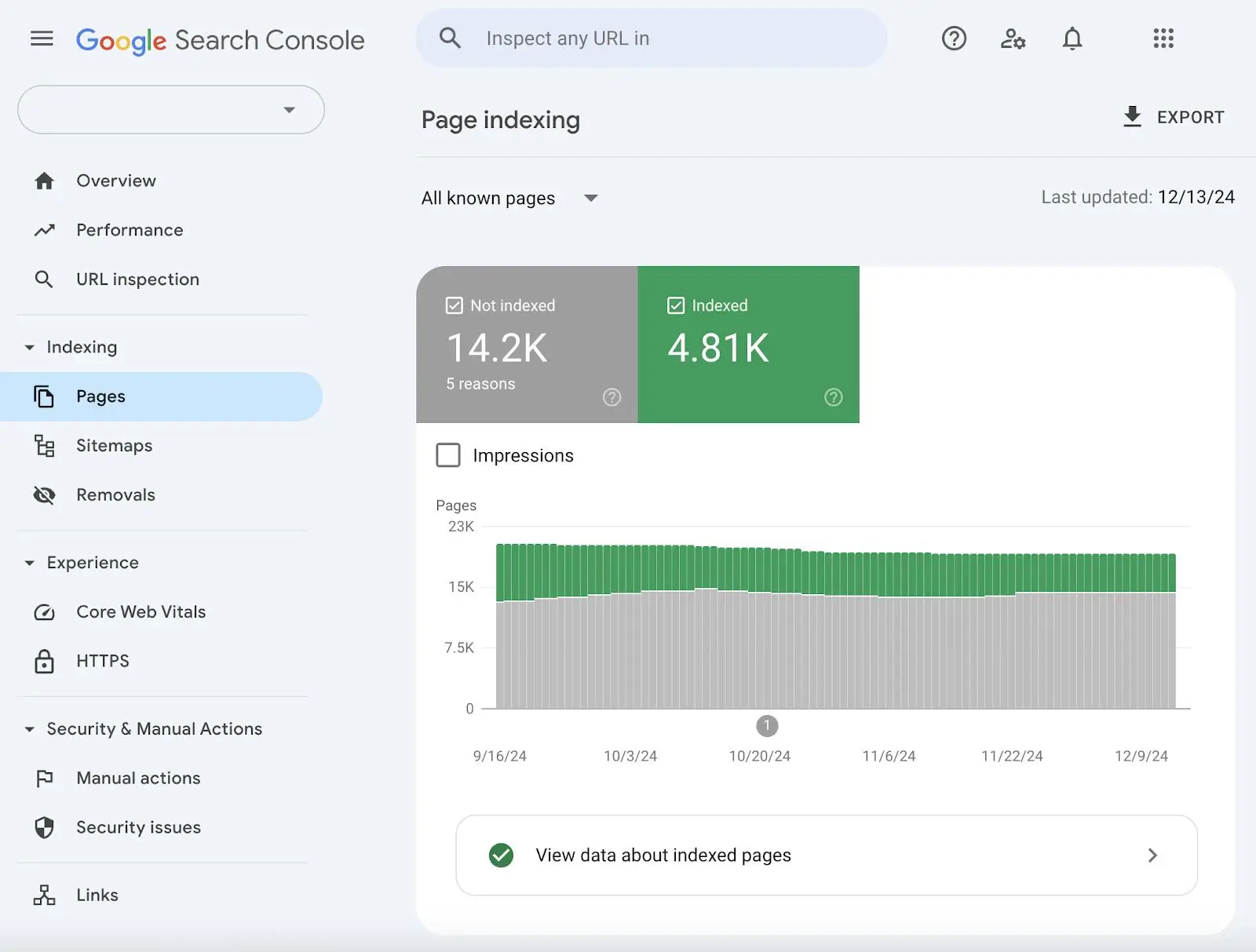
Google Search Console is your most authoritative and reliable starting point for understanding your site’s index health, and it is completely free. The Page Indexing Report delivers precise, actionable data directly from Google about every URL on your website. Here is how to access everything it offers.
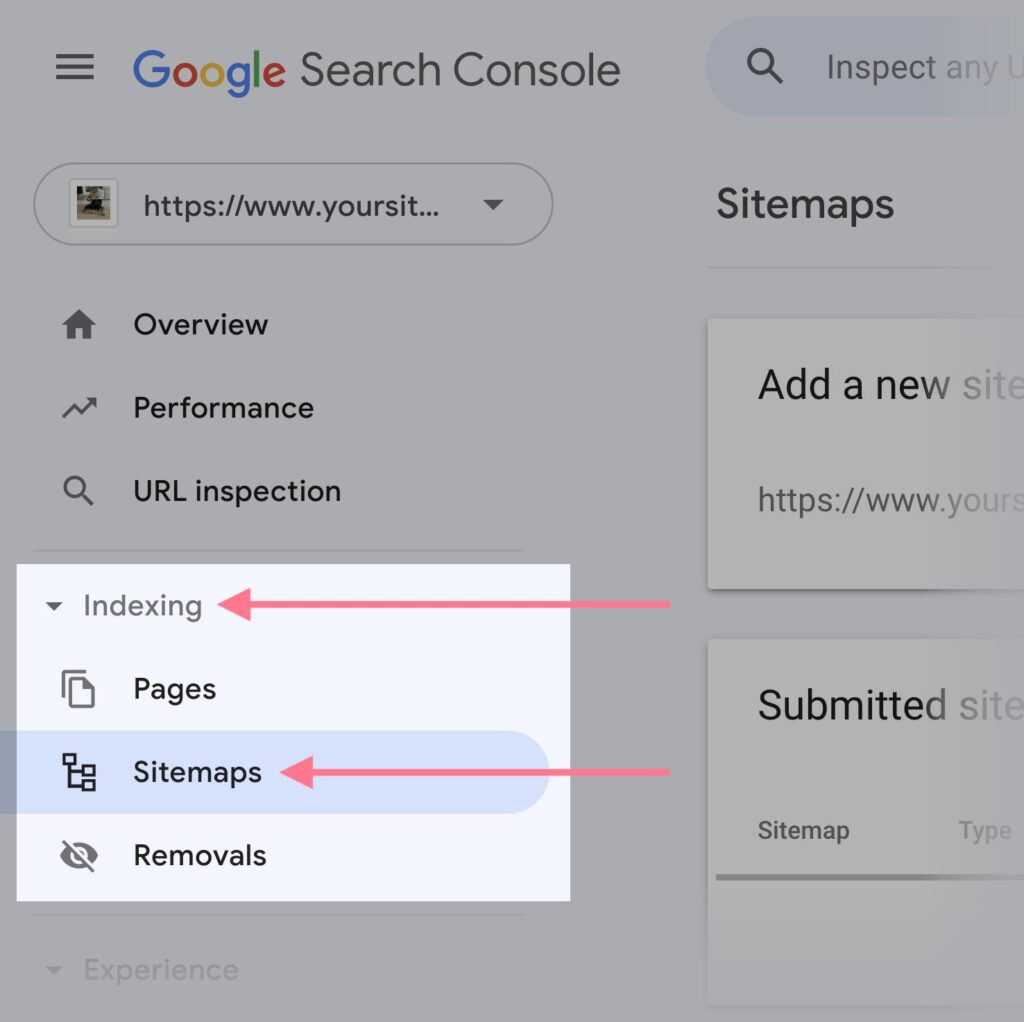
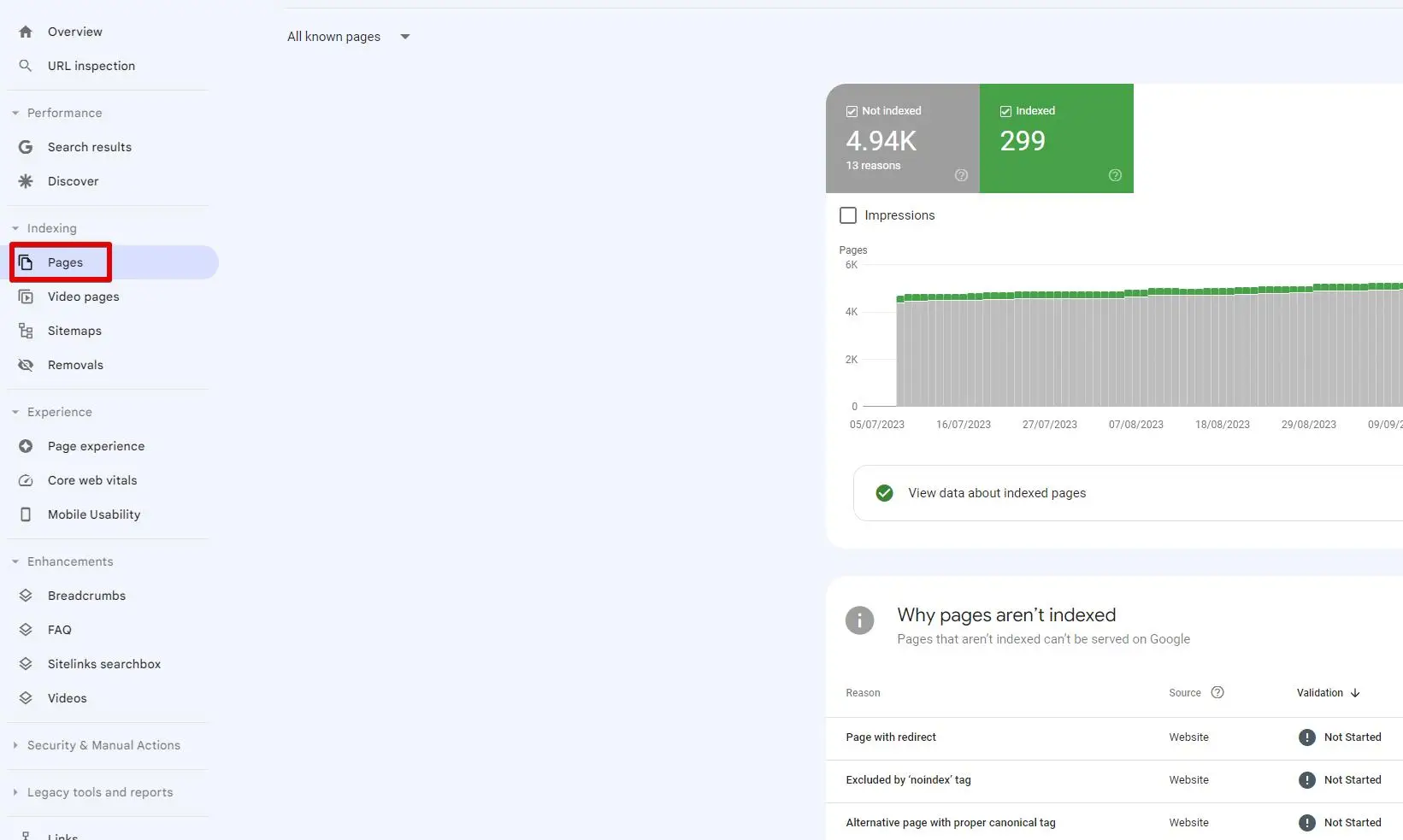
Log into Google Search Console, select your property, and navigate to Indexing in the left-hand panel. Click Pages and scroll down to the section labeled “Why pages aren’t indexed.” Google organizes your URLs into specific categories here, and each category comes with a list of affected pages ready for you to review and act on. Once you resolve the underlying issue for any category, clicking Validate Fix prompts Google to re-evaluate those pages right away.
Understanding each status gives you a clear path forward for every page on your site.
- “Crawled, currently not indexed” means Googlebot successfully visited and read your page, and you now have the opportunity to strengthen its content quality so Google adds it to the index on the next visit. Pages with richer content, stronger E-E-A-T signals, and better internal linking earn their index spot quickly. Research shows pages under 300 words carry a 37% higher likelihood of landing in this status, so expanding and enriching the content delivers a measurable improvement.
- “Discovered, currently not indexed” means Google has already found your page through your XML sitemap or internal links and plans to visit it. Strengthening your crawl budget through better site architecture, faster server response times, and a lean, high-quality URL structure encourages Googlebot to prioritize these pages sooner. Sites with proactively submitted sitemaps achieve a 29% higher index rate than pages relying on natural discovery alone.
- “Blocked by robots.txt” means a simple update to your robots.txt file gives Googlebot instant access to those pages. Checking the robots.txt report in Google Search Console under Settings helps you confirm that all your valuable pages receive the crawl access they deserve. Research attributes roughly 27% of indexing opportunities to robots.txt adjustments.
- Being excluded by a noindex tag means updating the meta robots tag from content=”noindex” to content=”index, follow” and resubmitting the URL through the URL Inspection Tool restores Google’s ability to index that page immediately. This is a straightforward fix that consistently delivers fast results.
- A soft 404 means strengthening the content on those pages so Google recognizes them as genuinely valuable, giving your site an immediate indexing boost. Redirecting URLs that no longer serve strong content toward your best resources also improves crawl efficiency across your entire site.
- Duplicate: Google chose a different canonical means, reviewing and aligning your canonical tags so Google indexes the version you intend. Solid canonical tag implementation is one of the clearest signals you can send to help Google understand your preferred page structure, which connects closely to how well your content is organized to earn featured snippet placements.
Checking One Page at a Time with the Inspection Tool
The URL Inspection Tool inside Google Search Console gives you a precise, real-time view of any individual URL’s indexing status. Access it by typing the full URL into the inspection bar at the top of your Search Console dashboard.
This tool shows you whether Google has indexed the page, what canonical version Google selected, whether your structured data and schema markup registered correctly, and whether Googlebot rendered the page’s JavaScript successfully. Clicking Test Live URL fetches your page in real time, confirming that every improvement you have made is fully visible to Google right now.
Requesting indexing directly through this tool is one of the most effective steps available. Research shows manually submitting URLs through Search Console increases indexing success by approximately 37 percentage points compared to waiting for natural crawling.
Confirming canonical clarity through this tool is especially valuable when your pages are built to win structured data and schema markup features on search results, since Google needs a clear canonical before it can surface any SERP feature for that content.
Using the “Site:” Command for a Quick Google Health Check
Typing site:yourdomain.com into Google’s search bar gives you an instant estimate of how many of your pages Google currently holds in its index. Comparing that number against your total page count reveals the size of your indexing opportunity at a glance. Keep in mind that Google displays a maximum of 1,000 results in a site search, so Google Search Console remains the authoritative source for full-site analysis. This quick check works beautifully as a first-pass health indicator before you dive deeper.
Checking Your Sitemap Against Your Actual Google Results
Your XML sitemap is one of your most valuable communication tools with Googlebot, and keeping it accurate and current gives your most important pages a meaningful indexing advantage. Comparing the URLs in your sitemap against the indexed pages shown in Search Console identifies your highest-priority growth opportunities immediately.
Including the lastmod tag on frequently updated pages signals freshness to Googlebot and encourages faster re-crawling of your best content. Keeping your sitemap focused on your strongest pages helps Google allocate its crawl resources toward the URLs that deliver the most value for your audience.
For WordPress sites, maintaining a clean and up-to-date CMS environment ensures your sitemap generation stays accurate and your indexing performance stays strong. This is one of the core reasons why consistent WordPress maintenance directly supports better SEO outcomes (Why WordPress Maintenance is Critical for SEO) over time. A well-maintained plugin environment keeps every sitemap entry pointing exactly where Google needs it to go.
Tracking Google’s Footprints Using Your Website’s Log Files
Server log files give you a complete and unfiltered record of every Googlebot visit to your site, making them one of the richest sources of crawl intelligence available. Log files show you the crawl frequency of each URL, the response codes Googlebot received, and which sections of your site attract consistent crawl attention.
Reviewing this data helps you identify which content areas are thriving in Google’s crawl priority and which ones present a growth opportunity to pursue. Strengthening internal linking toward under-crawled sections, improving page quality in those areas, and consolidating thin content into comprehensive resources all accelerate indexing performance meaningfully.
This is also why giving an SEO specialist appropriate server-level access enables faster and more precise diagnostics. Log file interpretation requires direct contact with your hosting environment, and when that access is in place, the path to stronger index health becomes clear very quickly.
How Writing for Your Readers Helps Google Find You
Technical fixes open the door for indexing success, and strong content quality is what keeps Google coming back. Following Google’s quality update periods in 2024 and 2025, websites publishing original, experience-rich, E-E-A-T-backed content have seen their indexing rates improve consistently and sustainably.
Every page that earns Google’s indexing confidence does so because it answers a specific question better than anything else available, demonstrates genuine firsthand expertise, and gives readers something they find genuinely useful. Strong content organization amplifies this further, since clearly structured pages are easier for Googlebot to evaluate and reward with a positive indexing decision. This is precisely why structuring your content specifically for featured snippets and healthy index performance are complementary goals that reinforce each other.
Pages with well-implemented schema markup give Google additional confidence in understanding the page’s purpose and relevance, which supports faster and more consistent indexing. Building the kind of content authority that wins positions in answer boxes and featured snippets also elevates your overall domain’s crawl priority, making future content easier to index as well.
Simple Fixes for Every Indexing Problem You Find
The most energizing fact about index health is that every category of unindexed page comes with a tested, achievable resolution path. Pages with access issues gain access through a simple configuration update. Pages with thin content grow stronger through enrichment and better internal linking. Crawl budget improves when your sitemap stays focused on your highest-quality URLs. Canonical clarity improves through thoughtful tag implementation.
Google Search Console delivers the exact priority list your site needs. The URL Inspection Tool confirms what Google sees in real time. Your XML sitemap guides Googlebot toward your best work. Your server logs reveal the patterns that explain crawl behavior at scale. Together these tools give you complete visibility and clear direction over your site’s indexing performance.
Pages that deliver genuine value to readers absolutely earn their place in Google’s index. Starting with Google Search Console today, working through each indexing opportunity with clarity and purpose, and investing in content that serves your audience well is the path toward lasting, growing, and highly rewarding organic search visibility.